Showing posts with label kaboodle. Show all posts

Sunday, May 3, 2009

National Scrapbook Day

So, did you make the rounds of all the stores and forums this weekend? I did well with what I was able to find and purchase but the one regret I had was that I missed the Scrap Girls sale which ended on Thursday at midnight! :( Scrap Girls always has Mischief Week which is their NSD celebration but it always occurs BEFORE NSD! Oh well, I guess I will just have to hang onto my Scrap Girls Kaboodle list until their next sale!

Anyway, these are the items that I snagged (for your convenience, items are linked in case you want some of these items):

folderfolder   FirstKissPreviewgradexpectations_prev   foldera_shelleyrae_OntheEdgePhotoMasksV2_PVW     a_shelleyrae_OTEPhotoMasksVol7_PVW shelleyrae_OntheEdgePhotoMasksVol5_PVW   folderfolder   folder   SBS_styles-acrylic_preview   SBS_WAO_preview_CUsbs_music_preview


Also, Danielle of Something Blue Studios put out a call for people to test a photo action. I was able to test it and not only did I get the action for free but Danielle also gave me a $10 gift certificate to her store! Talk about generous!


SBS_action_PB_preview


Can’t wait to get back to scrapping and use some of these goodies! How about you?

Wednesday, April 2, 2008

Digital Doings

The more I see of the products available to digital (and hybrid) scrappers, the more convinced I am how good we have it here on the Internet! The wealth and quality of the products available is overwhelming! I am constantly adding to my Kaboodle list in hopes that one day I may purchase it all!

In a previous post, An Organizing Tip and a Layout, I showcased my layout, Yesteryear. I used several recently purchased products in that one. The border of the layout came from Flergs' fabulous Butterfly Garden. I purchased this set as part of her larger collection, Border Collection, which contains not only the lovely clustered and unclustered leaf borders but also leaf borders with butterflies and individual butterflies and flowers! She also included some nice glitter borders as well.

In addition to Flergs' kits, I utilized some lovely flower doodles from Kate Hadfield available at Catscrap. I had purchased her Winter Flora Doodles for some of my Christmas layouts and just had to have her Spring ones as well! In addition to these, she has released a number of sets of new doodles available at The Lilypad as well as some doodle set collaborations with Jacque Larsen that are also available at The Lilypad. I think that Kate and Jacque's doodles are unique in that they are realistic with just the right amount of "cuteness" that can really add to the effectiveness of your layout!

Not to be left out, I also used a beaded flourish from Jofia Devoe's Swirls Therapy.

Jofia has several other unique products available that can definitely add a special touch to a layout. In my layout, Wheels, I used one of her moth overlays from Ephemerals II.

In Wheels I wanted a different look for this heritage layout of my mother riding her tricycle so I chose a very plain background paper and then converted one photo to a sketch. The other photo is framed with a frame from one of Jen Ulasiewicz's collection of Shabbier Chic Frames. The blue butterfly comes from the Butterfly Garden by Flergs shown earlier.

wheels_web

click image for full credits

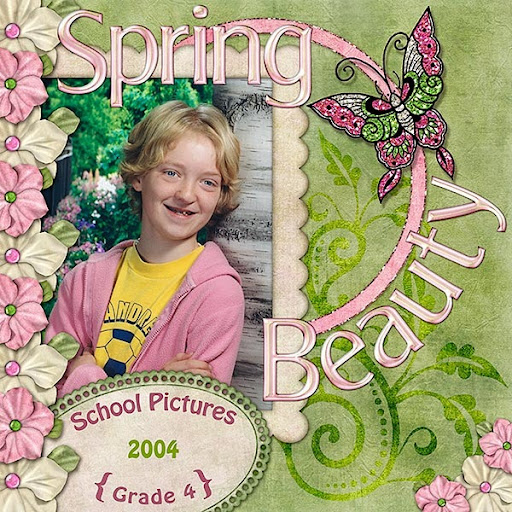
One last layout that I finished today utilizes one of Miki Ferkul's latest kits, Maia's Secret. I can't say enough about that kit! The colors are entirely spring-like, the papers are full of wonderful rich textures, and the elements are exquisite! Of course, I had to make use of some glitter from Flergs as well! Miki has another kit just out, Spring Linens, which is equally nice and which I hope to scrap my next layout!

spring_beauty_web

click image for full credits

I hope you have enjoyed both my layouts and my roundup of products out and about in the digi world!

Sunday, December 16, 2007

Last Chance Sale!

Last Chance Sale!


This is the last chance you will have this year to get DreamScrapper products on sale! This is a great time for you to stock up on holiday page kits as well as any other products that you may have put on your "to buy" or "Kaboodle" list. Look at what you may have missed:


Winter Mint 4 x 6 Brag Book

Winter Mint Page Kit

Holiday Elegance Page Kit

Spiced Eggnog Page Kit

Merry and Bright Page Kit

Winter Pink Page Kit

Tuesday, October 16, 2007

Take Your Layouts With You!

For those of you who like gadgets, you may be interested in the new Pocket Album by Digital Foci. This is a slick little number that holds up to 74 pictures that can be scrolled manually or shown via slide show. The album has a 1.5" color screen and runs on a lithium battery designed to give 9 hours battery life.

The Pocket Album comes complete with user-friendly software needed to convert JPG or BMP files from your computer to Pocket Album. The software lets you view, crop and rotate photos you wish to transfer before it automatically resizes them for optimal storage and display on the unit. Pocket Album can be recharged with an included AC adapter or via USB attached to your computer. The album comes complete with built in clock with automatic on/off timer and LCD contrast adjustment.

All this for $39.95! You can bet this will be on my Kaboodle list! Just think . . . you can buy a few of these for Christmas presents and pre-load them with your favorite layouts! How sweet is that?


Pocket Album by Digital Foci

Friday, September 28, 2007

A Couple of Things . . .

I am so glad that you like my newest kit, Bounty in Burlap! I have received many favorable comments on it. Today, I received notice that my kit has been featured on Scrap Praise! As a new designer and store owner, this is very exciting and encouraging! I hope that you, my readers, will continue to enjoy the kits I design. I would appreciate some feedback from you as to the kind of kits you are looking for or need. What colors do you want? I tend to favor very bold colors so if that's not what you are after, I need to hear from you so I can accommodate your needs! What themes do you want in your kits? What type of textures and patterns do you like in the papers of a kit? Is there some special element that you would like to see included in a kit? Leave me a comment below.


Don't forget to use Kaboodle to bookmark your wish list of items from my store! Be sure to include dreamscrapper as a tag so that I can do a search and possibly find you to bestow a RAK (Random Act of Kindness) of some sort! I have already gifted one lucky recipient with a special coupon to my store. You could be next!

Thursday, September 13, 2007

Store Launch is a Success!

Well, I am stoked! Yesterday was the launch of my store, DreamScrapper.com, and I was pleased with the response I received! Thank you for making my launch a success!

Remember that the storewide 20% off will be in effect until September 19. The following layout was made using the exclusive page kit, Autumn Glory:

grade8_website600
Click for enlarged image

What layouts are you creating with this kit? I would love to see your results! Please leave me a comment with a link to your layout.

For those of you who use Kaboodle, if you save any of my products, be sure to create a tag for dreamscrapper so that if I do a search there, I can RAK those of you that turn up in a search.

I would also enjoy receiving any comments/critiques you have about DreamScrapper.com.

  1. What do you like best about the site?
  2. Was the site setup pleasing to the eye and easy to navigate?
  3. Was the checkout service satisfactory?
  4. What suggestions do you have for improvement?
  5. What type of products would you like to see developed?

I look forward to your comments . . . you may comment by clicking the comment link directly following this post.

Wednesday, August 1, 2007

Summer Frenzy Add-on Freebie Re-issued

Oooooooops! There was something about the clipped flower cluster in the Summer Frenzy Add-on that has been bugging me. Something just didn't look right. Finally, I realized what it was . . . in placing the clip, I turned the clip the wrong way! Because of this, I have re-issued the freebie. I have also included both a shadowed and unshadowed version of the cluster in the download. If you downloaded the original, be sure to download this newest version so that your cluster looks like it is supposed to look!

This file is no longer available for download.
Thank you for all your comments on it!


Be sure to leave me a comment if you download!

Also, I have had a few comments by people who have missed my freebies because the links were no longer available. My freebies will not have an indefinite expiry date so you are best to grab them as soon as you see them! However, all my freebies will be placed in my store when it opens so if you missed something, you will be able to pick it up there. Once my items hit the store, you may want to take advantage of adding them to your Kaboodle, as outlined in my Kit and Kaboodle post. Be sure to add tags to them such as "summer frenzy" and "dreamscrapper" so that when I want to RAK someone, I can do a search in Kaboodle and find people who have my items on their list.

Monday, July 30, 2007

Kit and Kaboodle!

I had the chance to create another layout today. I am pleased with the way it turned out. It details the start of my daughter's trip to Calgary this summer. What do you think?

Click image for full credits.

Now, I promised that I would give you some info on Kaboodle . . . another tool to add to your digital scrapbooking arsenal!

What the heck is a kaboodle and why do I need it? Kaboodle is a quick and easy way to keep lists of items from the internet. In Kaboodle, you can create several different lists such as a Digital Scrapbooking Wish List, Inspirational Layouts, etc. Kaboodle is very easy to set up and involves installing two buttons o
n the navigation bar of your web browser. One button will take you to Kaboodle to look over your lists, organize, etc. The other button will allow you to add things to your Kaboodle lists.


The way that Kaboodle works when you add something to it is really slick! After clicking the Add to Kaboodle button, you will be taken to your Kaboodle main page where you can choose the list that you want to use. Then, you can fill in a description or comment, if you want, and tags. Tags help you and others to find items on Kaboodle. So if you were adding a kit by Misty Cato, you might include her name as a tag, as well as "page kit", and other terms that may help in searching for the item. You also have the opportunity to create a new section in the list to place your item. For instance, you might have different sections for different stores or you could just insert the store name as a tag.

Let's see how it works. I'm looking at Misty Cato's new kit,
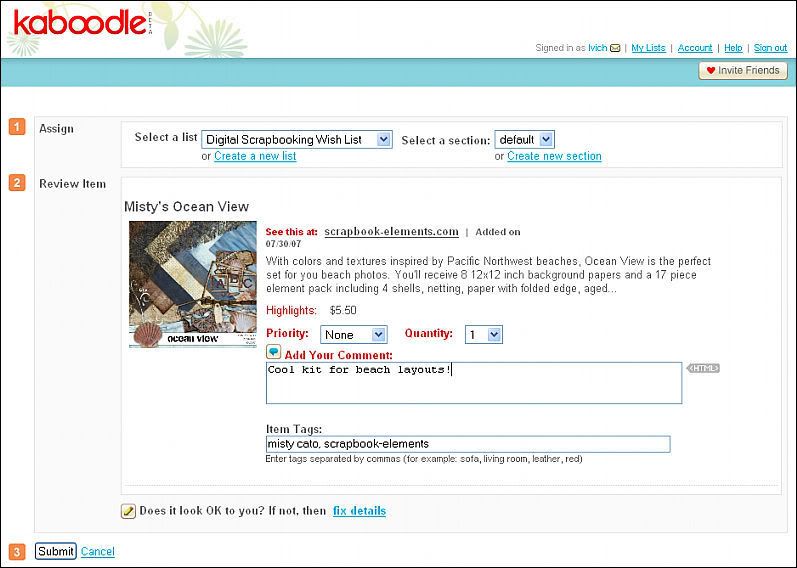
Misty's Ocean View. I have made sure to navigate to the individual product page to get the largest image size available. I click my Add to Kaboodle button and this is what I see:

Click image for larger view.

Note the three sections to be completed:
  1. Assign - decide what list you wish to use and create a new section if desired.
  2. Review Item - Add a comment, if desired, and tags. Be sure that the image looks correct. If it doesn't or there is no image, click "fix details" to be presented with a choice of images.
  3. Submit - Click here to add the item.
I have assigned the item to my Digital Scrapbooking Wish List, added a comment and assigned the tags, "misty cato" and "scrapbook-elements."

Now, after clicking the button you are magically transferred back to the page you were on and you don't even have to press the back button a few times to get back to where you really wanted to be! Sweet!

Ok, so now you have the item on your list, so what? Well, let's pretend to buy something to see how Kaboodle helps us.

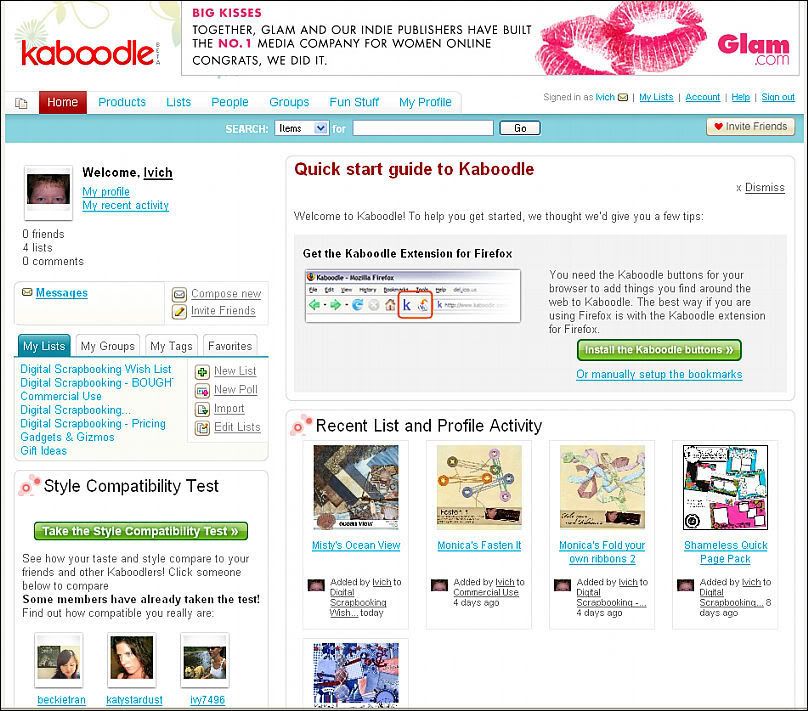
Click the Kaboodle button to be taken to your main Kaboodle interface. This is what I see at mine:

Click image for larger view.

I want to buy something from my Wish List so I click on the link for that in the My Lists section. Then I can scroll through my list until I find what I want to buy. I'd like to get the Goin' Postal Frames & Clusters so I click on that link to be taken to the individual page. There I get a larger view of the item and I can read its full description. If I still want to buy, I click on the link in the Shop For It box. This takes me right to the item in the store and I can proceed with my purchase.

To help you even more with your scrapbooking addiction, to the right you will see links to other related items or even links to other people's lists! If you view their list and find something you want on it, you can click on an Add to My List button and now it's on your list!

Now there is so much more to Kaboodle . . . you can get buttons for your blog or website, you can send a link of your Wish List to friends and family and you can display your lists in different ways such as slide shows.

One other reason you would want to use Kaboodle . . . to get FREE STUFF!

In my earlier post, Forum Acronyms Revealed! I gave links to some short forms that are used a lot on digital scrapbooking forums. If you checked out the Digital Scrapbook Lingo link, you may have read about a RAK or Random Act of Kindness. Designers have been known to look through the wish lists on Kaboodle and send a freebie to a lucky recipient!

So, if you haven't done so already, go check out Kaboodle! Be sure to check out the quick start guide and then explore all the other things that Kaboodle has to offer!

If you currently are a Kaboodle user, be sure to leave me a comment about ways that you use Kaboodle.

Saturday, July 28, 2007

Tools for Digital Scrapbooking

Well, no freebies today . . . I actually got some scrapbooking done for myself! The layout is created mainly using Shameless by Kim Jensen. As soon as I saw that kit, I knew I would have to get it! Needless to say, it didn't remain on my Kaboodle list for long! Here is my two-page layout from today:


Now, I promised you some tools for scrapbooking . . . I will share a few with you today.

First, I will deal with a few tools that make your online shopping and viewing experience a LOT easier and more enjoyable.

Firefox Mozilla is my browser of choice, even though Internet Explorer has recently been upgraded to contain some similar features. Why do I like Firefox? I first switched over to it because of the tabbed viewing. Tabbed viewing allows you to have multiple web pages open at the same time and navigate easily between them by simply clicking the "tab" for that page. Having several pages open at the same time allows me to view one page while another is loading or to download from one page and read a forum in another. I can also bookmark groups of pages/tabs to open at the same time. This allows me to organize the forums, for instance, that I read on a daily basis. Instead of opening one bookmark and then another, I can open all at once.

Another reason that I am partial to Firefox is because of the many Add-ons or Extensions that you can get for it that also help me to browse forums quickly or to navigate more effectively. One such add-on I would not be without is Cooliris.

Cooliris really lets me fly through the forums! Instead of clicking on each post that I think I might like to read, I can simply hover my cursor over the link to get a popup window which displays the page. I can easily navigate through this page to read an entire thread or simply move my mouse to exit from it if it doesn't appeal to me. If instead I had clicked a link, I would then have to click the back button to return to where I was and wait for the page to load. Cool Iris is also good for checking out freebies. A lot of posters of freebies will include a preview in the post. I can easily view the post to see if the freebie is of interest to me.

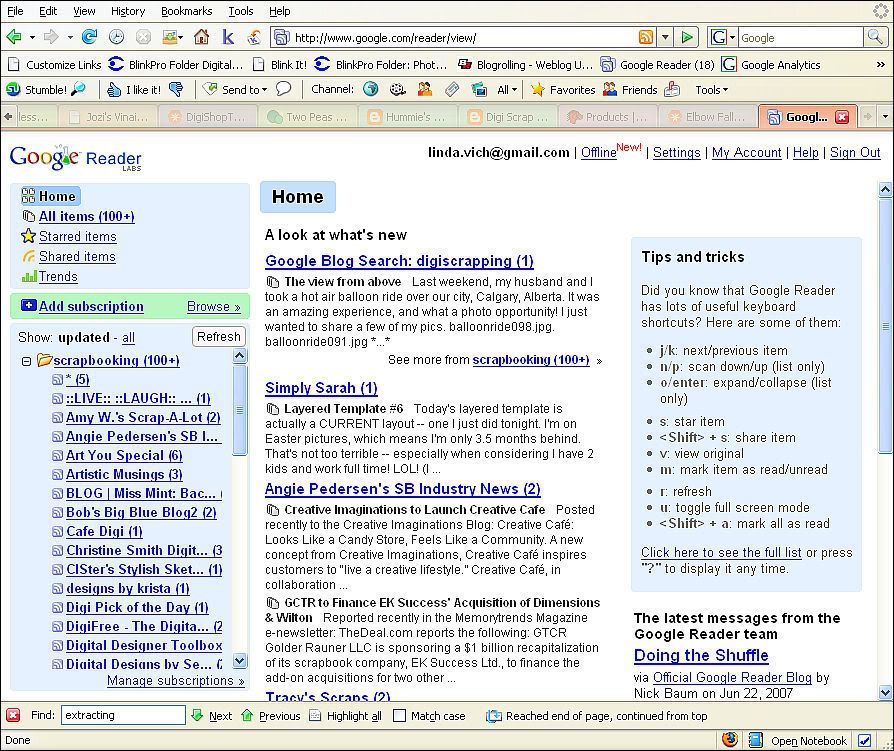
Another tool for the web that helps me keep up with the world of scrapbooking is the blog reader, Google Reader. Google Reader allows me to easily subscribe to all the blogs that I read ( and there are several!) but keep and access them all in one place. The listing of blogs is easily configured to show you a link only to those blogs that have been updated since your last visit. This is a tremendous timesaver because I don't have to travel to each individual site to see if a blog has an update.

Click on image to see larger view

Well, that's all for today! Stay tuned for some time saving tools to help you with your scrapbooking.

One other tool that I have just started using and enjoying is Kaboodle. However, I will have to save blogging about that one for another day as it is getting late!